Not every open task has the same urgency or impact.
← HealthTech product ecosystem
Case 03 · Professional software · Cognitive load
Giving physicians control without building an aircraft cockpit.
I designed a workspace that helps professionals recognize priorities, gather context and act safely without forcing them to navigate the system’s full complexity.
Fragmented clinical work
Professionals need depth, but not all of it at once.
Each patient may accumulate intake data, lab results, documents, therapeutic strategies, messages and follow-up tasks. Physicians also move between the day’s schedule, consultations in progress and cases awaiting review.
The challenge was not to reduce clinical information, but to organize it so professionals could enter the system, understand what changed and continue without mentally reconstructing every case.
02 / Problem
The core tension
More information can produce less clarity.
Decisions depend on information distributed across multiple moments.
Physicians need to catch up without rereading the complete history.
AI suggestions cannot be confused with validated decisions.
Design questionHow might we show enough information and control for safe action without turning the interface into an aircraft cockpit?
My work
I organized the product around the work physicians need to complete.
I defined the relationship between schedule, clinical inbox, active cases, consultation and follow-up to avoid isolated journeys.
I prioritized recent changes, operational risks and next actions over general metrics or summaries.
I grouped information by purpose: prepare, review, decide, document and continue.
I used panels and modals for brief tasks while preserving patient context and reducing navigation depth.
I defined states distinguishing original information, AI-organized content and professional-confirmed decisions.
From signal to continuity
Four moments guide each intervention.
This pattern repeats across the schedule, active cases, results awaiting review and follow-up tasks.
How cognitive load was reduced
The interface reveals complexity only when it supports a decision.
Priority before volume
The inbox highlights what changed, why it matters and the next action instead of presenting every available data point.
Context on demand
Secondary information remains accessible in panels and modals without competing with the active clinical task.
Actions beside evidence
Reviewing, validating, signing or requesting information happens near the data that prompted the decision.
Explicit, reversible AI
Each suggestion identifies its origin, requires professional validation and can be edited, discarded or escalated.
An action-oriented hierarchy
Three layers keep information useful and manageable.
Changes, open tasks and states that justify entering the case.
Clinical summary, sources and traceability available at the right moment.
Validate, sign, respond, request or schedule without leaving the flow.
Exploration for thinking and communication
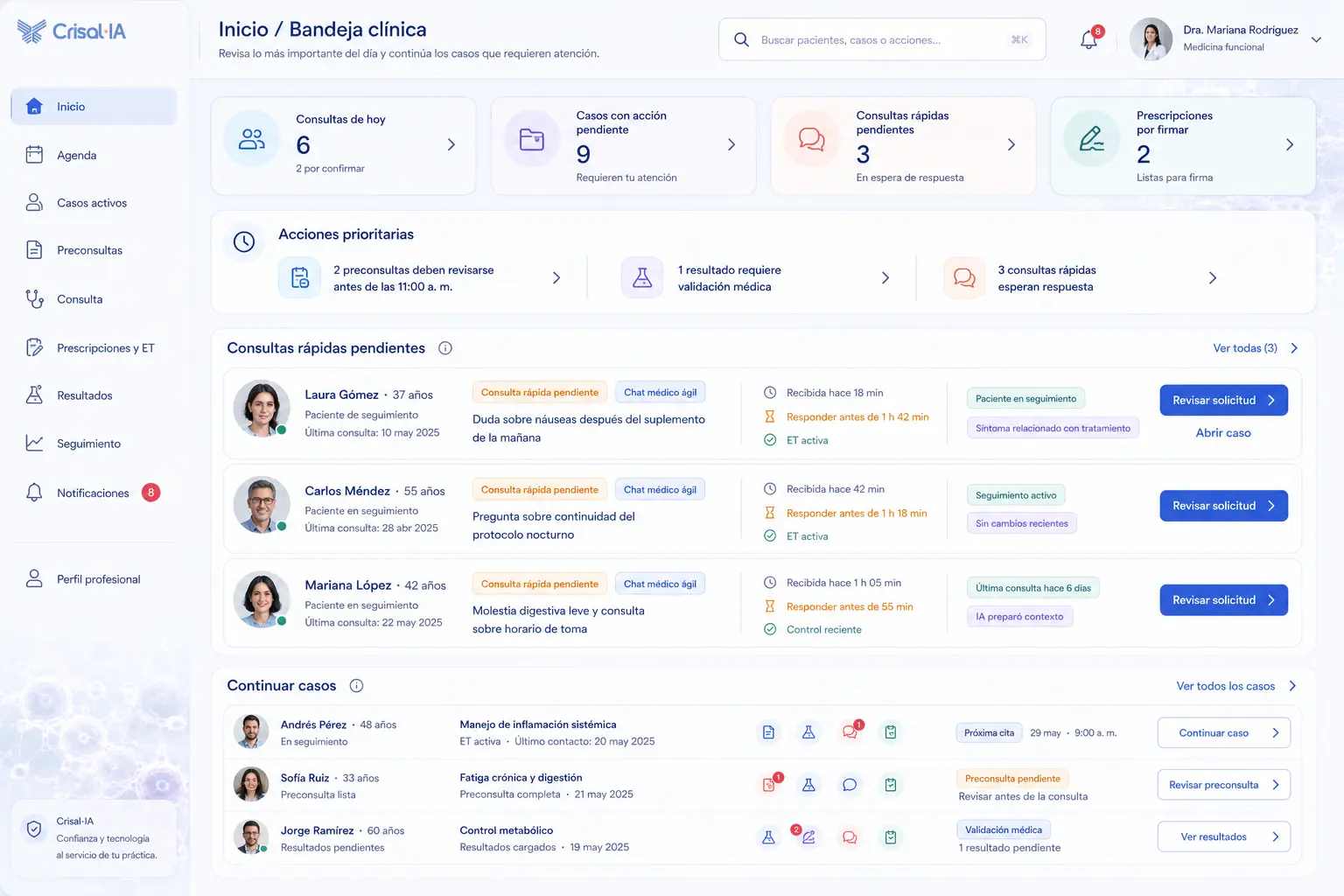
The inbox helped explore hierarchy before reducing MVP density.
The visualization brings together signals, consultations and cases to test what professionals need at the start. It was not the final structure; it became a basis for prioritizing information, actions and levels of detail.
 Open larger image ↗
An exploration used to evaluate the relationship between schedule, open tasks and continuity before simplifying the physician workspace.
Concept exploration · UX/Product direction · AI-assisted visualization08 / Tools
Tools tied to decisions.
- Figma
- Flows, wireframes, UI, prototypes and components.
- FigJam
- Architecture, professional tasks and case states.
- ChatGPT + GenAI
- Exploration, edge cases, microcopy and documentation.
- Functional definition
- Rules, states, permissions, exceptions and handoff.
09 / Outcome
Verifiable design outcomes
A coherent model for daily clinical work.
- Inbox and schedule organized around attention and next actions.
- Clinical context brought together without exposing the full history in every view.
- Reusable patterns to review, validate, sign and follow up.
- Explicit states for AI suggestions and professional validation.
- Flows prepared for estimation, prototyping and incremental development.
The product remains in development; these are architecture and design outcomes. Review time and perceived workload must be validated through real use.
What this case reinforced
In professional software, simplifying does not mean showing less. It means preventing users from having to decide what to look at before they can work.
The next stage should observe how physicians prioritize real cases, how long they take to recover context and when they need to expand or reduce detail.
Next case
AI-assisted Consultation.
How AI can transcribe, organize and suggest without replacing clinical judgment.